أضف i18n إلى تطبيق Next.js App Router في طلب سحب واحد
تشغيل واحد لـ localize.dev على تطبيق Next.js 16 جديد: ما يجده، وما يغيره في مكونات العميل والخادم، وما لا تزال تفعله يدويًا، وكيف يتم شحنه كطلب سحب واحد.
Stephen Ufort · 16 نوفمبر 2026 · 7 دقائق للقراءة
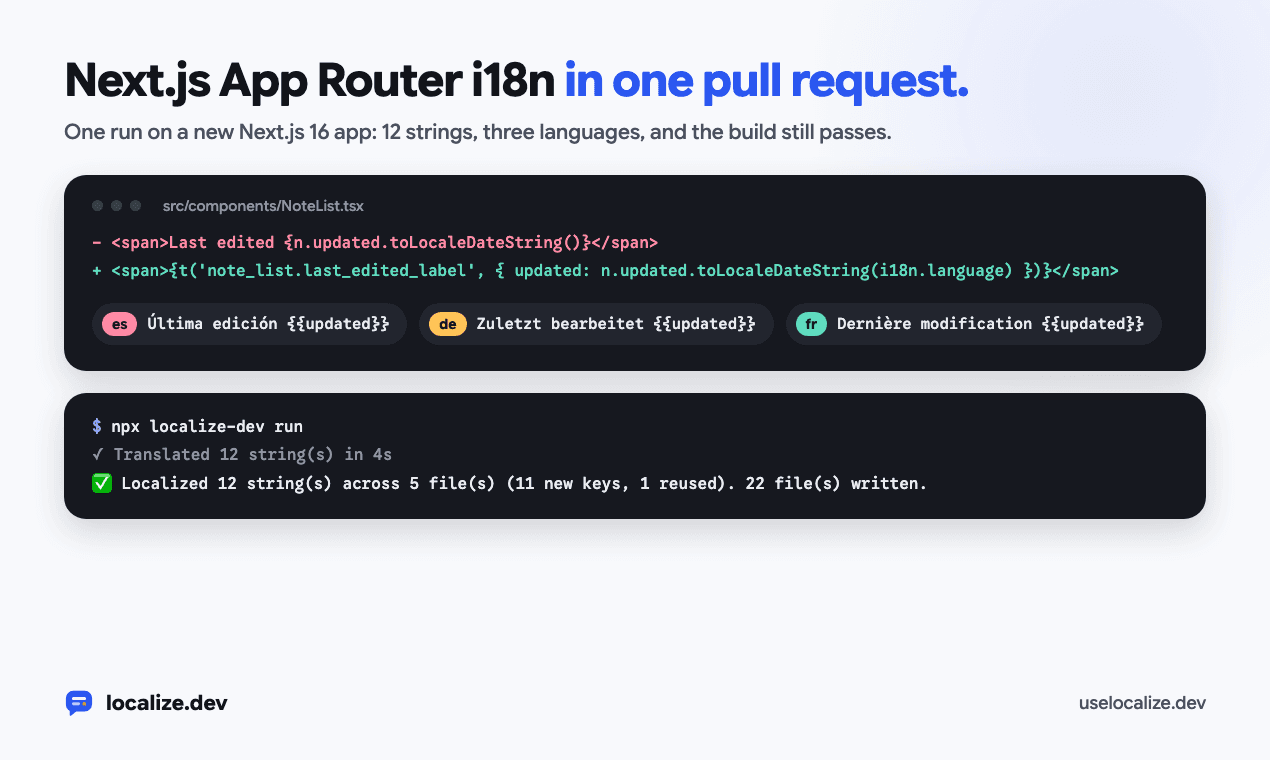
هذا هو تشغيل واحد لـ localize.dev على تطبيق Next.js 16 App Router جديد، من الفحص الأول إلى طلب السحب. كل أمر وملف وسطر إخراج أدناه يأتي من هذا التشغيل.
التطبيق هو تطبيق ملاحظات صغير تم إنشاؤه باستخدام create-next-app: صفحة رئيسية مع نموذج تسجيل دخول، وصفحة ملاحظات، ومكونين للعميل وبيانات وصفية للصفحة. يعرض اثني عشر جزءًا من نص واجهة المستخدم، وكلها مكتوبة باللغة الإنجليزية.
شاهد ما هو مكتوب بالترميز الثابت
ابدأ بـ check. يعمل على جهازك، ولا يحتاج إلى حساب ولا يغير شيئًا:
$ npx localize-dev check
  src/app/layout.tsx:6  "Shared notes your team can search in seconds."
  src/app/notes/page.tsx:6  "My notes"
  src/app/notes/page.tsx:13  "My notes"
  src/app/page.tsx:7  "Shared notes your team can search in seconds"
  src/app/page.tsx:9  "Write meeting notes, tag them and find them again from any workspace. Read the <a>quick start</a> or start a free trial."
  src/components/NoteList.tsx:12  "Search your notes"
  src/components/NoteList.tsx:13  "{count} notes"
  src/components/NoteList.tsx:14  "Nothing matches "{query}". Try another word."
  src/components/NoteList.tsx:19  "Last edited {updated}"
  src/components/SignUpForm.tsx:12  "Check your email address and try again."
  src/components/SignUpForm.tsx:25  "Your work email"
  src/components/SignUpForm.tsx:29  "Get started"
⚠️  12 hardcoded string(s) in 5 file(s). Fix with: npx localize-dev run
يسرد أكثر من نص JSX: وصف البيانات الوصفية، وعنصر نائب، و aria-label ورسالة خطأ تم تمريرها إلى setError. يظهر الجمع مرة واحدة كـ {count} notes، والجملة مع تاريخ كـ Last edited {updated}، لأن كل واحد من هؤلاء يصبح رسالة واحدة.
احتفظ باسم المنتج
عنوان الصفحة هو فقط اسم المنتج، Acme Notes. ترجم تشغيل سابق بدون أي تكوين إلى "Acme Notas" بالإسبانية. أضف الاسم إلى doNotTranslate، وسرد اللغات التي تريدها:
{
  "targetLocales": ["es", "de", "fr"],
  "doNotTranslate": ["Acme Notes"]
}
النص المكون من هذه الأسماء فقط لا يُحتسب كنص، ولهذا السبب العنوان ليس في القائمة أعلاه. حيث يظهر الاسم داخل جملة أطول، تحتفظ كل لغة به كما هو مكتوب.
قم بتشغيله
يمنح run مفتاحًا لكل سلسلة نصية، ويعيد كتابة الكود، ويترجم الرسائل الجديدة، ويقوم بإعداد i18next لمسار التطبيق. يحتاج إلى مفتاح API (npx localize-dev login). تغطي الخطة المجانية 1000 سلسلة نصية شهريًا بثلاث لغات، وهو ما يزيد عن حاجة هذا التطبيق.
$ npx localize-dev run
🔍 Scanning src/ (target locales: es, de, fr)
Requesting keys/translations for 12 unique string(s) in 5 batch(es)...
✓ Translated 12 string(s) in 4s

src/app/layout.tsx
  L6  'Shared notes your team can search in seconds.'  →  t('layout.shared_notes_description')

src/app/notes/page.tsx
  L6  'My notes'  →  t('notes.metadata_title')
  L13  My notes  →  {t('notes.metadata_title')}

src/app/page.tsx
  L7  Shared notes your team can search in seconds  →  {t('home.hero_heading')}
  L9  Write meeting notes, tag them and find them again from any workspace. Read the <Link href="/docs">quick start</Link> or start a free trial.  →  <Trans t={t} i18n={i18n} i18nKey="home.meeting_notes_description" components={{ a: <Link href="/docs" /> }} />

src/components/NoteList.tsx
  L12  "Search your notes"  →  {t('note_list.search_placeholder')}
  L13  {shown.length === 1 ? '1 note' : `${shown.length} notes`}  →  {t('note_list.notes_count', { count: shown.length })}
  L14  Nothing matches "{query}". Try another word.  →  {t('note_list.no_results_message', { query })}
  L19  Last edited {n.updated.toLocaleDateString()}  →  {t('note_list.last_edited_label', { updated: n.updated.toLocaleDateString(i18n.language) })}

src/components/SignUpForm.tsx
  L12  'Check your email address and try again.'  →  t('signup.email_error')
  L25  "Your work email"  →  {t('signup.work_email_input_label')}
  L29  Get started  →  {t('signup.get_started_button')}

✅ Localized 12 string(s) across 5 file(s) (11 new keys, 1 reused). 22 file(s) written.
📦 Added i18next, react-i18next, localize-dev to package.json
🛠️  Created src/i18n.ts, imported in src/app/layout.tsx
🌐 Added <LanguageSwitcher /> in src/language-switcher.tsx; render it where people pick a language
⚠️  Set "siteUrl" in localize.config.json (https://your-site.com): `src/app/sitemap.ts` needs full addresses, and off Vercel, Netlify, Render and Railway it has no other way to know them.
⚠️  Locale files now merge key by key: run this once per clone (and in CI before merging) so git uses it: git config merge.localize-dev.driver "npx localize-dev merge-locales %O %A %B %P"
👉 Run `npm install` to install them.
كتب التشغيل 22 ملفًا. تعد تعديلات الكود صغيرة، ومعظم الملفات جديدة: ملفات اللغة وإعداد i18n. تصرف بناءً على الملاحظتين في النهاية: قم بتعيين siteUrl إذا لم يتم نشر التطبيق على Vercel أو Netlify أو Render أو Railway، وقم بتشغيل السطر git config مرة واحدة لكل نسخة حتى تندمج ملفات اللغة مفتاحًا بمفتاح.
مكون عميل
NoteList هو مكون عميل، لذا يحصل على useTranslation():
'use client';

import { useState } from 'react';
import type { Note } from '@/lib/notes';
import { useTranslation } from 'react-i18next';

export function NoteList({ notes }: { notes: Note[] }) {
  const { t, i18n } = useTranslation();
  const [query, setQuery] = useState('');
  const shown = notes.filter((n) => n.title.toLowerCase().includes(query.toLowerCase()));

  return (
    <section className="mt-6">
      <input value={query} onChange={(e) => setQuery(e.target.value)} placeholder={t('note_list.search_placeholder')} className="w-full rounded border px-3 py-2" />
      <p className="mt-2 text-sm text-gray-500">{t('note_list.notes_count', { count: shown.length })}</p>
      {shown.length === 0 && <p className="mt-6">{t('note_list.no_results_message', { query })}</p>}
      <ul className="mt-4 space-y-2">
        {shown.map((n) => (
          <li key={n.id} className="rounded border p-3">
            <span className="font-medium">{n.title}</span>
            <span className="ms-2 text-sm text-gray-500">{t('note_list.last_edited_label', { updated: n.updated.toLocaleDateString(i18n.language) })}</span>
          </li>
        ))}
      </ul>
    </section>
  );
}
أصبحت الصيغة الثلاثية 1 note أو N notes رسالة جمع واحدة مع count، لذا تحصل اللغة التي تحتوي على أشكال جمع أكثر على جميعها (حصلت الإسبانية على المفرد والجمع والآخر). ظل التاريخ داخل جملته كعنصر نائب يسمى updated، لذا تضعه الألمانية بعد "Zuletzt bearbeitet" ويمكن للغة التي تضع التاريخ أولاً. يتم الآن تنسيق التاريخ باستخدام i18n.language، لغة الطلب. قبل التشغيل كان يستخدم المتصفح. في /es/notes يقرأ 11/10/2026، اليوم أولاً.
مكون خادم
لا يمكن لمكونات الخادم استخدام الخطافات، لذا تنتظر الصفحة الرئيسية getTranslation() بدلاً من ذلك. تصبح الجملة التي تحتوي على رابط <Trans> الذي يحتفظ بـ <Link> الخاص بك:
import Link from 'next/link';
import { SignUpForm } from '@/components/SignUpForm';
import { getTranslation } from '../i18n.server';
import { Trans } from 'react-i18next/TransWithoutContext';

export default async function Home() {
  const { t, i18n } = await getTranslation();
  return (
    <main className="mx-auto max-w-2xl px-6 py-24">
      <h1 className="text-4xl font-semibold">{t('home.hero_heading')}</h1>
      <p className="mt-4 text-lg text-gray-600">
        <Trans t={t} i18n={i18n} i18nKey="home.meeting_notes_description" components={{ a: <Link href="/docs" /> }} />
      </p>
      <SignUpForm />
    </main>
  );
}
تعمل البيانات الوصفية بنفس الطريقة. أصبح export const metadata generateMetadata() يترجم العنوان والوصف لكل طلب، مع العنوان الأساسي و og:locale بلغة الطلب.
الإعداد الذي يضيفه
يبدأ كل ملف جديد بتعليق يوضح ما يفعله:
src/proxy.ts:/es/notesيعرض/notesبالإسبانية، لذا فإن لكل لغة عنوانها الخاص. تتبع العناوين غير المسبوقة ملف تعريف الارتباطlang، ثمAccept-Language.src/i18n.server.ts:getTranslation()للمكونات الخادمة، مع لغة الطلب.src/i18n-provider.tsxوsrc/i18n.ts: مثيل i18next واحد لكل شجرة عرض للمكونات العميلة، لذلك لا يتشارك طلبان بلغتين مختلفتين أبدًا في مثيل واحد.src/i18n-seo.ts،src/i18n-alternates.tsx،src/app/sitemap.tsوsrc/app/robots.ts: عناوين أساسية، og:locale، روابط hreflang وخريطة موقع مع كل صفحة بكل لغة.locales/en.json،es.json،de.json،fr.jsonوlocalize.lock.json، والتي تسجل مما تم إنشاء كل ترجمة، لذا فإن التشغيل اللاحق يترجم فقط ما تغير.src/language-switcher.tsx، وسطر.gitattributesبحيث تندمج فرعان يضيفان مفاتيح دون تعارض.
يقرأ التخطيط الجذر الآن اللغة لكل طلب ويضبط <html lang dir> منها، لذا يتم وضع لغة من اليمين إلى اليسار من اليمين إلى اليسار منذ أول عرض.
عرض مبدل اللغة
يقوم التشغيل بإنشاء <LanguageSwitcher /> ولكنه يترك التنسيب لك. إليك كيفية وضعه في رأس صفحة الملاحظات:
import { LanguageSwitcher } from '../../language-switcher';

export default async function NotesPage() {
  const { t } = await getTranslation();
  const notes = await getNotes();
  return (
    <main className="mx-auto max-w-2xl px-6 py-12">
      <header className="flex items-center justify-between">
        <h1 className="text-2xl font-semibold">{t('notes.metadata_title')}</h1>
        <LanguageSwitcher />
      </header>
      <NoteList notes={notes} />
    </main>
  );
}
يحفظ الاختيار في ملف تعريف الارتباط lang ويقوم بالتحديث، لذا يتم عرض مكونات الخادم باللغة الجديدة أيضًا.
اقرأ الترجمات
يجب على شخص يقرأ كل لغة إلقاء نظرة على ملفات اللغة في الفرق. تحقق من الكلمات ذات المعنيين، والأسماء التي كان يجب أن تظل كما هي مكتوبة، وكيف يخاطب التطبيق القارئ. يرسل localize.dev شكلاً واحدًا من أشكال الخطاب لكل لغة مع كل دفعة (Sie بالألمانية، vous بالفرنسية، tú بالإسبانية)، لذا لا يخلط تشغيل واحد بينها. إذا كان تطبيقك يقول du، فضع ذلك في ملاحظات الأسلوب في مسرد مساحة العمل الخاصة بك.
{
  "layout": {
    "shared_notes_description": "Notas compartidas que tu equipo puede buscar en segundos."
  },
  "notes": {
    "metadata_title": "Mis notas"
  },
  "home": {
    "hero_heading": "Notas compartidas que tu equipo puede buscar en segundos",
    "meeting_notes_description": "Escribe notas de reuniones, etiquétalas y encuéntralas de nuevo desde cualquier espacio de trabajo. Lee la <a>guía de inicio rápido</a> o inicia una prueba gratuita."
  },
  "note_list": {
    "search_placeholder": "Busca tus notas",
    "notes_count_one": "{{count}} nota",
    "notes_count_many": "{{count}} notas",
    "notes_count_other": "{{count}} notas",
    "no_results_message": "Nada coincide con \"{{query}}\". Intenta con otra palabra.",
    "last_edited_label": "Última edición {{updated}}"
  },
  "signup": {
    "email_error": "Comprueba tu dirección de correo electrónico y vuelve a intentarlo.",
    "work_email_input_label": "Tu correo electrónico del trabajo",
    "get_started_button": "Empezar"
  }
}
لتغيير ترجمة، قم بتحرير ملف اللغة. التشغيل التالي يترجم فقط الرسائل التي تغيرت باللغة الإنجليزية، لذا فإنه يترك تعديلك وشأنه.
افتح طلب السحب
ضع التشغيل على فرع، تحقق من أن التطبيق لا يزال يبني، وافتح طلب السحب:
git switch -c add-languages
npx localize-dev run
npm install
npm run build
git add -A
git commit -m "Spanish, German and French"
gh pr create --fill
يقوم npx localize-dev pr بنفس الشيء في خطوة واحدة: يقوم بتشغيل الترجمة ويفتح طلب السحب من فرع localize-dev/<branch>، مع رمز مميز من GITHUB_TOKEN.
احتفظ بها مترجمة
ستضيف الميزة التالية نصًا إنجليزيًا مرة أخرى. قم بتشغيل npx localize-dev check في CI لاكتشافه: لا يحتاج إلى مفتاح، ويفشل في النسخ المضمنة أو الترجمة المفقودة. أو أضف GitHub Action، الذي يترجم النص الجديد عند كل دفعة ويفتح طلب سحب واحد به:
# Copy to .github/workflows/localize.yml in the repository you want to localize.
# Needs the repository secret LOCALIZEDEV_API_KEY (create a key in the localize.dev dashboard).
name: Localize

on:
  push:
    branches: [main] # your default branch
  pull_request:
    types: [opened, synchronize]
  workflow_dispatch: # "Run workflow" button in the Actions tab

permissions:
  contents: write # push the localize-dev/<branch> branch
  pull-requests: write # open or update the localization PR

# One run per branch at a time; a newer push supersedes the running one.
concurrency:
  group: localize-${{ github.head_ref || github.ref_name }}
  cancel-in-progress: true

jobs:
  localize:
    runs-on: ubuntu-latest
    timeout-minutes: 60
    # Skip localize.dev's own branches, and fork PRs (their token is read-only).
    if: >-
      !startsWith(github.head_ref || github.ref_name, 'localize-dev/') &&
      (github.event_name != 'pull_request' || github.event.pull_request.head.repo.full_name == github.repository)
    steps:
      - name: Checkout
        uses: actions/checkout@v5
        with:
          # On PRs, scan the branch itself rather than the merge commit.
          ref: ${{ github.head_ref || github.ref_name }}

      - name: Localize
        uses: ufortstephen/autolocalize-action@v1
        with:
          github_token: ${{ secrets.GITHUB_TOKEN }}
          api_key: ${{ secrets.LOCALIZEDEV_API_KEY }}
          target_locales: 'es,de,fr'
          # src_dir: 'src' # default: your framework's (src, app/views, resources/views, lib…)
          # locales_path: 'public/locales/{locale}/common.json' # default: your framework's
          # working_directory: 'apps/web' # monorepo: localize just this app
تحتاج سير العمل إلى سر مستودع LOCALIZEDEV_API_KEY، وتتخطى فروع localize-dev/ الخاصة بها.