How localize.dev rewrites hardcoded strings without breaking your code
What the engine treats as UI text, how it edits a file without reformatting it, what it refuses to guess at, and why a second run changes nothing.
Stephen Ufort · November 12, 2026 · 5 min read
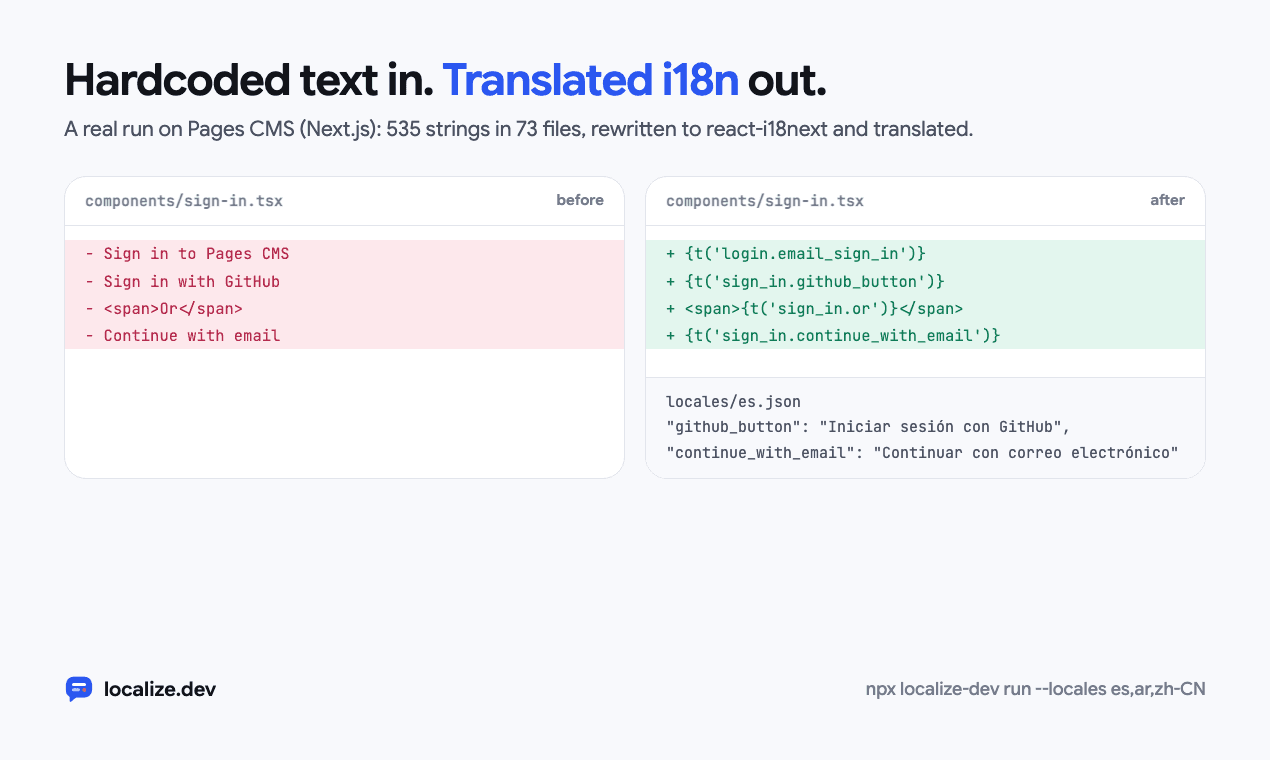
Pages CMS is an open-source Next.js app with no i18n. One run of npx localize-dev run --locales es,ar,zh-CN moved 535 strings in 73 files to react-i18next: 395 new keys, plus 140 places that reused a key because the same text already had one. TypeScript compiled before the run and after it. Two validation messages were skipped, and the pull request lists them with the reason.
You can only let a tool edit 73 files if you can trust the diff. This post covers how the engine decides what to change, how it makes the change, and when it stops and leaves the decision to you.
Rules rewrite the code; a model names keys and translates
Everything that touches your source files is deterministic code. The model has two jobs: proposing a key name such as settings.notifications_heading, and translating. It never sees a whole file and never edits one, so it can’t reformat your code, rename a variable or drop an import.
Finding the text people see
Each file goes through a parser for its stack. JSX and TSX go through @babel/parser. Vue, Svelte, Angular, Astro and Ember templates go through each framework’s own compiler, and plain HTML through parse5. ERB, Django and Blade tags are tokenized and masked first, and the page then goes through parse5 too. Swift, Dart and Android code are read with smaller hand-written lexers.
A string in the syntax tree isn’t automatically UI text. The main rule is about where it ends up. A literal counts when it reaches a JSX child, or an attribute people read such as placeholder, alt, title or aria-label, and it may pass through a ternary, &&, || or parentheses on the way. A class name never gets there, and neither does an argument to console.log or to an analytics call.
This component comes from the scanner’s test suite. Of all the strings in it, the scanner extracts one:
const A = ({ x }) => {
  console.log(`debug ${x}`);
  const label = 'Not in JSX';
  return <div className={`btn ${x}`} onClick={() => track('Clicked')}>
    <code>npm i</code><pre>raw</pre>
    <span translate="no">Brand</span>
    <div data-i18n-ignore><p>Skip me</p></div>
    <Trans>Already done</Trans>
    {t('existing.key')}
    {x ? 'primary' : 'secondary-btn'}
  </div>;
};
// extracted: ['primary']
Both branches of the ternary reach the output, but secondary-btn fails a second set of filters that look at the value itself. Snake, kebab and dotted ids never count, and neither do URLs, paths, colours, emails, file names, prices, versions or class lists. Text inside code, pre or <Trans>, or under translate="no" or data-i18n-ignore, is left alone.
Some text reaches people through code instead of markup: toast(), alert(), confirm(), document.title, and validation messages in zod or yup schemas. The scanner recognizes those by the call they’re passed to.
Editing without reprinting the file
The usual way to rewrite code is to change the syntax tree and print it again, which reformats everything the printer touches. localize.dev never prints the tree. It takes the offsets the parser reports and splices each change into the original text with magic-string, so every line it doesn’t change keeps its exact formatting, comments included.
Here is a small component and what the engine writes for it. The keys here were named offline; in a real run the model names them.
export function Settings({ user }) {
  return (
    <section className="settings">
      <h2>Notifications</h2>
      <p>Signed in as {user.email}</p>
      <input placeholder="Search settings" />
      <p>Read the <a href="/help">help center</a> before you change these.</p>
    </section>
  );
}import { useTranslation, Trans } from 'react-i18next';
export function Settings({ user }) {
const { t } = useTranslation();
return (
<section className="settings">
<h2>{t('settings.notifications')}</h2>
<p>{t('settings.signed_in_as', { email: user.email })}</p>
<input placeholder={t('settings.search_settings')} />
<p><Trans i18nKey="settings.read_the_help_center_before" components={{ a: <a href="/help" /> }} /></p>
</section>
);
}{user.email} became a named value, so translators see Signed in as {{email}} and can move it. The sentence with the link stayed whole as one <Trans> message, because a translator needs the full sentence to put the link in the right place.
Getting t into scope follows the code that’s already there. An existing const { t } = useTranslation() in the function is reused. Otherwise the hook line goes before the first statement, and a short arrow body is opened up to make room for it. Next.js server components get await getTranslation() and become async; class components get withTranslation(). The import goes after your last import, and only if it’s missing.
When it won’t guess
Some strings can’t be rewritten safely. Those are skipped and listed with a reason. A message in a schema built outside any component has no t to call at that point, which is why the two Pages CMS strings were skipped. Other reasons include a t that already means something else in that scope, and a constant that’s exported or read by more than one component, where changing it could break the other readers.
Skipped strings appear in the pull request under “Skipped strings”, and localize-dev check keeps reporting them until someone moves them.
Running it twice changes nothing
After a run, the text is t('key'). A string passed to t() doesn’t reach the output as a literal, so the scanner doesn’t pick it up again. The pipeline only queues strings that have no key, or keys that are missing a translation, and files whose content came out the same are left out of the result. The test suite runs the engine on its own output and expects no changes.
Checking translations before they’re written
Each translation is checked against its source: placeholders, markup tags, and every plural form the language needs, which is six for Arabic and one for Japanese. A translation that fails is asked for once more with the reason attached. If it fails again, it’s left out and reported, never written. A separate post covers that in detail.
What leaves your machine
Parsing and rewriting run on your machine or your CI runner. For each string, the model gets the text with its placeholders, the file path, and a short hint such as "placeholder" attribute on <input> in component <Login>. It doesn’t get your source code. check, scan and --offline runs send nothing.
What it doesn’t do
- React and Next.js output is react-i18next. If your app already uses react-intl, next-intl or Lingui, localize.dev won’t write to them.
- Swift, Dart and Android are read with lexers, not their compilers.
- Strings it can’t place are listed, and moving them is up to you.
If it got your code wrong, I’d like to see the file. The playground runs this engine on code you paste, with no account.
Try it on your own code in the playground, no account needed