Aggiungi i18n a un'app Next.js App Router in una singola pull request
Un'esecuzione di localize.dev su una nuova app Next.js 16: cosa trova, cosa modifica nei componenti client e server, cosa fai ancora a mano e come viene spedita come una singola pull request.
Stephen Ufort · 16 novembre 2026 · 8 min di lettura
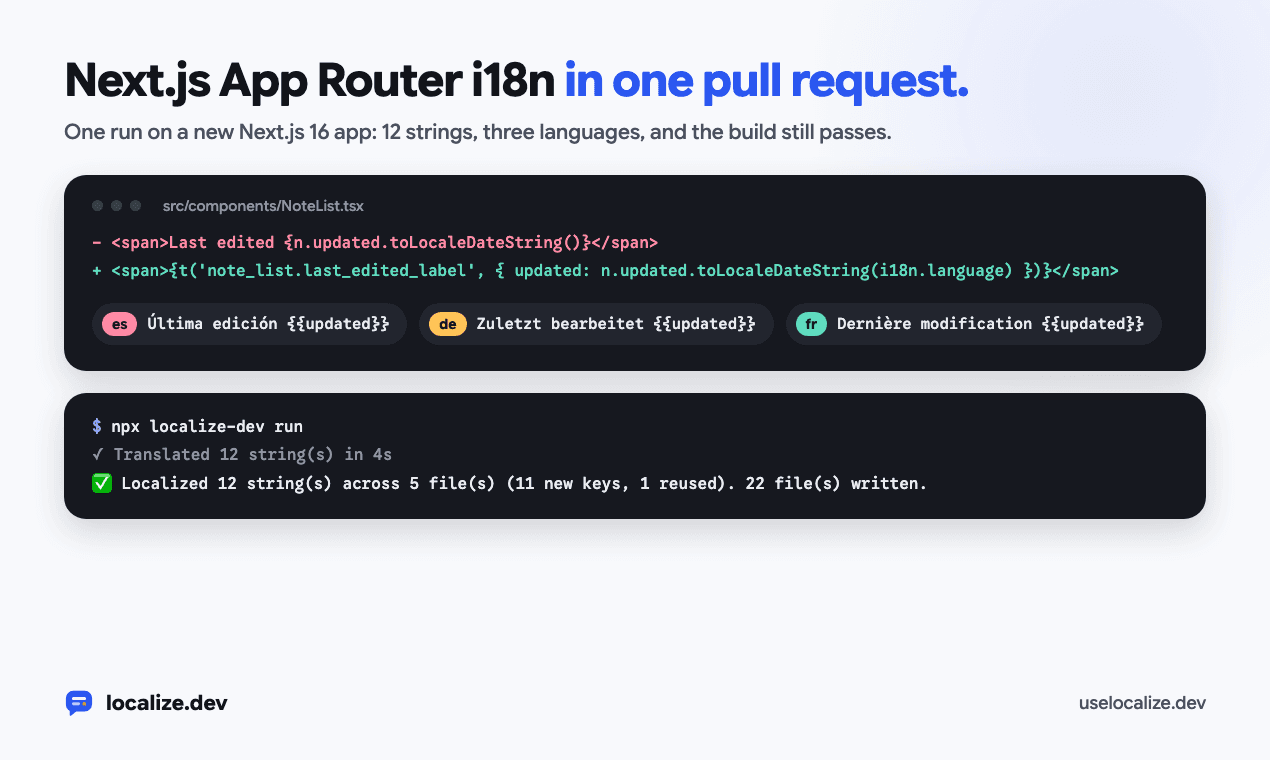
Questa è un'esecuzione di localize.dev su una nuova app Next.js 16 App Router, dal primo controllo alla pull request. Ogni comando, file e riga di output di seguito proviene da quell'esecuzione.
L'app è una piccola app per le note creata con create-next-app: una home page con un modulo di iscrizione, una pagina delle note, due componenti client e metadati della pagina. Mostra dodici elementi di testo dell'interfaccia utente, tutti codificati in inglese.
Vedi cosa è codificato
Inizia con check. Viene eseguito sulla tua macchina, non richiede alcun account e non cambia nulla:
$ npx localize-dev check
  src/app/layout.tsx:6  "Shared notes your team can search in seconds."
  src/app/notes/page.tsx:6  "My notes"
  src/app/notes/page.tsx:13  "My notes"
  src/app/page.tsx:7  "Shared notes your team can search in seconds"
  src/app/page.tsx:9  "Write meeting notes, tag them and find them again from any workspace. Read the <a>quick start</a> or start a free trial."
  src/components/NoteList.tsx:12  "Search your notes"
  src/components/NoteList.tsx:13  "{count} notes"
  src/components/NoteList.tsx:14  "Nothing matches "{query}". Try another word."
  src/components/NoteList.tsx:19  "Last edited {updated}"
  src/components/SignUpForm.tsx:12  "Check your email address and try again."
  src/components/SignUpForm.tsx:25  "Your work email"
  src/components/SignUpForm.tsx:29  "Get started"
⚠️  12 hardcoded string(s) in 5 file(s). Fix with: npx localize-dev run
Elenca più del testo JSX: la descrizione dei metadati, un segnaposto, un aria-label e un messaggio di errore passato a setError. Il plurale appare una volta come {count} notes, e la frase con una data come Last edited {updated}, perché ognuno di questi diventa un messaggio.
Mantieni il nome del prodotto
Il titolo della pagina è solo il nome del prodotto, Acme Notes. Un'esecuzione precedente senza alcuna configurazione lo ha tradotto in "Acme Notas" in spagnolo. Aggiungi il nome a doNotTranslate e elenca le lingue che desideri:
{
  "targetLocales": ["es", "de", "fr"],
  "doNotTranslate": ["Acme Notes"]
}
Il testo composto solo da questi nomi non viene più conteggiato come copia, motivo per cui il titolo non è nell'elenco sopra. Dove il nome appare all'interno di una frase più lunga, ogni lingua lo mantiene così com'è scritto.
Eseguilo
run assegna una chiave a ogni stringa, riscrive il codice, traduce i nuovi messaggi e imposta i18next per l'App Router. Richiede una chiave API (npx localize-dev login). Il piano gratuito copre 1.000 stringhe al mese in 3 lingue, che è più di quanto questa app necessiti.
$ npx localize-dev run
🔍 Scanning src/ (target locales: es, de, fr)
Requesting keys/translations for 12 unique string(s) in 5 batch(es)...
✓ Translated 12 string(s) in 4s

src/app/layout.tsx
  L6  'Shared notes your team can search in seconds.'  →  t('layout.shared_notes_description')

src/app/notes/page.tsx
  L6  'My notes'  →  t('notes.metadata_title')
  L13  My notes  →  {t('notes.metadata_title')}

src/app/page.tsx
  L7  Shared notes your team can search in seconds  →  {t('home.hero_heading')}
  L9  Write meeting notes, tag them and find them again from any workspace. Read the <Link href="/docs">quick start</Link> or start a free trial.  →  <Trans t={t} i18n={i18n} i18nKey="home.meeting_notes_description" components={{ a: <Link href="/docs" /> }} />

src/components/NoteList.tsx
  L12  "Search your notes"  →  {t('note_list.search_placeholder')}
  L13  {shown.length === 1 ? '1 note' : `${shown.length} notes`}  →  {t('note_list.notes_count', { count: shown.length })}
  L14  Nothing matches "{query}". Try another word.  →  {t('note_list.no_results_message', { query })}
  L19  Last edited {n.updated.toLocaleDateString()}  →  {t('note_list.last_edited_label', { updated: n.updated.toLocaleDateString(i18n.language) })}

src/components/SignUpForm.tsx
  L12  'Check your email address and try again.'  →  t('signup.email_error')
  L25  "Your work email"  →  {t('signup.work_email_input_label')}
  L29  Get started  →  {t('signup.get_started_button')}

✅ Localized 12 string(s) across 5 file(s) (11 new keys, 1 reused). 22 file(s) written.
📦 Added i18next, react-i18next, localize-dev to package.json
🛠️  Created src/i18n.ts, imported in src/app/layout.tsx
🌐 Added <LanguageSwitcher /> in src/language-switcher.tsx; render it where people pick a language
⚠️  Set "siteUrl" in localize.config.json (https://your-site.com): `src/app/sitemap.ts` needs full addresses, and off Vercel, Netlify, Render and Railway it has no other way to know them.
⚠️  Locale files now merge key by key: run this once per clone (and in CI before merging) so git uses it: git config merge.localize-dev.driver "npx localize-dev merge-locales %O %A %B %P"
👉 Run `npm install` to install them.
L'esecuzione ha scritto 22 file. Le modifiche al codice sono piccole e la maggior parte dei file sono nuovi: i file di localizzazione e l'impostazione i18n. Agisci sulle due note alla fine: imposta siteUrl se l'app non è distribuita su Vercel, Netlify, Render o Railway, ed esegui la riga git config una volta per clone in modo che i file di localizzazione si uniscano chiave per chiave.
Un componente client
NoteList è un componente client, quindi ottiene useTranslation():
'use client';

import { useState } from 'react';
import type { Note } from '@/lib/notes';
import { useTranslation } from 'react-i18next';

export function NoteList({ notes }: { notes: Note[] }) {
  const { t, i18n } = useTranslation();
  const [query, setQuery] = useState('');
  const shown = notes.filter((n) => n.title.toLowerCase().includes(query.toLowerCase()));

  return (
    <section className="mt-6">
      <input value={query} onChange={(e) => setQuery(e.target.value)} placeholder={t('note_list.search_placeholder')} className="w-full rounded border px-3 py-2" />
      <p className="mt-2 text-sm text-gray-500">{t('note_list.notes_count', { count: shown.length })}</p>
      {shown.length === 0 && <p className="mt-6">{t('note_list.no_results_message', { query })}</p>}
      <ul className="mt-4 space-y-2">
        {shown.map((n) => (
          <li key={n.id} className="rounded border p-3">
            <span className="font-medium">{n.title}</span>
            <span className="ms-2 text-sm text-gray-500">{t('note_list.last_edited_label', { updated: n.updated.toLocaleDateString(i18n.language) })}</span>
          </li>
        ))}
      </ul>
    </section>
  );
}
Il ternario 1 note o N notes è diventato un messaggio plurale con un count, quindi una lingua con più forme plurali le ottiene tutte (lo spagnolo ha ottenuto one, many e other). La data è rimasta all'interno della sua frase come segnaposto chiamato updated, quindi il tedesco lo inserisce dopo "Zuletzt bearbeitet" e una lingua che mette la data per prima può farlo. La data ora è formattata con i18n.language, la lingua della richiesta. Prima dell'esecuzione utilizzava quella del browser. Il /es/notes legge 11/10/2026, giorno prima.
Un componente server
I componenti server non possono usare hook, quindi la home page attende invece getTranslation(). La frase con un link diventa un <Trans> che mantiene il tuo <Link>:
import Link from 'next/link';
import { SignUpForm } from '@/components/SignUpForm';
import { getTranslation } from '../i18n.server';
import { Trans } from 'react-i18next/TransWithoutContext';

export default async function Home() {
  const { t, i18n } = await getTranslation();
  return (
    <main className="mx-auto max-w-2xl px-6 py-24">
      <h1 className="text-4xl font-semibold">{t('home.hero_heading')}</h1>
      <p className="mt-4 text-lg text-gray-600">
        <Trans t={t} i18n={i18n} i18nKey="home.meeting_notes_description" components={{ a: <Link href="/docs" /> }} />
      </p>
      <SignUpForm />
    </main>
  );
}
I metadati funzionano allo stesso modo. export const metadata è diventato un generateMetadata() che traduce il titolo e la descrizione per ogni richiesta, con l'indirizzo canonico e l'og:locale della lingua della richiesta.
La configurazione che aggiunge
Ogni nuovo file inizia con un commento che dice cosa fa:
src/proxy.ts:/es/notesesegue il rendering di/notesin spagnolo, quindi ogni lingua ha il proprio indirizzo. Gli indirizzi senza prefisso seguono il cookielang, quindiAccept-Language.src/i18n.server.ts:getTranslation()per i componenti server, con la lingua della richiesta.src/i18n-provider.tsxesrc/i18n.ts: un'istanza i18next per albero di rendering per i componenti client, quindi due richieste in lingue diverse non ne condividono mai una.src/i18n-seo.ts,src/i18n-alternates.tsx,src/app/sitemap.tsesrc/app/robots.ts: indirizzi canonici, og:locale, link hreflang e una sitemap con ogni pagina in ogni lingua.locales/en.json,es.json,de.json,fr.jsonelocalize.lock.json, che registra da cosa è stata creata ogni traduzione, in modo che un'esecuzione successiva traduca solo ciò che è cambiato.src/language-switcher.tsx, e una riga.gitattributesin modo che due branch che aggiungono entrambe chiavi si uniscano senza conflitti.
Il layout principale ora legge la lingua per ogni richiesta e imposta <html lang dir> da essa, in modo che una lingua da destra a sinistra sia disposta da destra a sinistra fin dalla prima visualizzazione.
Mostra un selettore di lingua
L'esecuzione genera <LanguageSwitcher /> ma lascia a te la scelta del posizionamento. Ecco come appare nell'intestazione della pagina delle note:
import { LanguageSwitcher } from '../../language-switcher';

export default async function NotesPage() {
  const { t } = await getTranslation();
  const notes = await getNotes();
  return (
    <main className="mx-auto max-w-2xl px-6 py-12">
      <header className="flex items-center justify-between">
        <h1 className="text-2xl font-semibold">{t('notes.metadata_title')}</h1>
        <LanguageSwitcher />
      </header>
      <NoteList notes={notes} />
    </main>
  );
}
Salva la scelta nel cookie lang e si aggiorna, in modo che anche i componenti server vengano renderizzati nella nuova lingua.
Leggi le traduzioni
Qualcuno che legge ogni lingua dovrebbe esaminare i file di locale nel diff. Controlla le parole con due significati, i nomi che sarebbero dovuti rimanere scritti come sono, e come l'app si rivolge al lettore. localize.dev invia una forma di indirizzo per lingua con ogni batch (Sie in tedesco, vous in francese, tú in spagnolo), in modo che un'esecuzione non le mescoli. Se la tua app dice du, mettilo nelle note di stile del glossario del tuo spazio di lavoro.
{
  "layout": {
    "shared_notes_description": "Notas compartidas que tu equipo puede buscar en segundos."
  },
  "notes": {
    "metadata_title": "Mis notas"
  },
  "home": {
    "hero_heading": "Notas compartidas que tu equipo puede buscar en segundos",
    "meeting_notes_description": "Escribe notas de reuniones, etiquétalas y encuéntralas de nuevo desde cualquier espacio de trabajo. Lee la <a>guía de inicio rápido</a> o inicia una prueba gratuita."
  },
  "note_list": {
    "search_placeholder": "Busca tus notas",
    "notes_count_one": "{{count}} nota",
    "notes_count_many": "{{count}} notas",
    "notes_count_other": "{{count}} notas",
    "no_results_message": "Nada coincide con \"{{query}}\". Intenta con otra palabra.",
    "last_edited_label": "Última edición {{updated}}"
  },
  "signup": {
    "email_error": "Comprueba tu dirección de correo electrónico y vuelve a intentarlo.",
    "work_email_input_label": "Tu correo electrónico del trabajo",
    "get_started_button": "Empezar"
  }
}
Per cambiare una traduzione, modifica il file di locale. La prossima esecuzione traduce solo i messaggi il cui inglese è cambiato, quindi lascia invariata la tua modifica.
Apri la pull request
Metti l'esecuzione su un branch, verifica che l'app si compili ancora e apri la pull request:
git switch -c add-languages
npx localize-dev run
npm install
npm run build
git add -A
git commit -m "Spanish, German and French"
gh pr create --fill
npx localize-dev pr fa la stessa cosa in un unico passaggio: esegue la localizzazione e apre la pull request da un branch localize-dev/<branch>, con un token da GITHUB_TOKEN.
Mantienilo tradotto
La prossima funzionalità aggiungerà nuovamente testo in inglese. Esegui npx localize-dev check in CI per intercettarlo: non necessita di una chiave e fallisce in caso di testo hardcoded o traduzione mancante. Oppure aggiungi la GitHub Action, che traduce il nuovo testo ad ogni push e apre una pull request con esso:
# Copy to .github/workflows/localize.yml in the repository you want to localize.
# Needs the repository secret LOCALIZEDEV_API_KEY (create a key in the localize.dev dashboard).
name: Localize

on:
  push:
    branches: [main] # your default branch
  pull_request:
    types: [opened, synchronize]
  workflow_dispatch: # "Run workflow" button in the Actions tab

permissions:
  contents: write # push the localize-dev/<branch> branch
  pull-requests: write # open or update the localization PR

# One run per branch at a time; a newer push supersedes the running one.
concurrency:
  group: localize-${{ github.head_ref || github.ref_name }}
  cancel-in-progress: true

jobs:
  localize:
    runs-on: ubuntu-latest
    timeout-minutes: 60
    # Skip localize.dev's own branches, and fork PRs (their token is read-only).
    if: >-
      !startsWith(github.head_ref || github.ref_name, 'localize-dev/') &&
      (github.event_name != 'pull_request' || github.event.pull_request.head.repo.full_name == github.repository)
    steps:
      - name: Checkout
        uses: actions/checkout@v5
        with:
          # On PRs, scan the branch itself rather than the merge commit.
          ref: ${{ github.head_ref || github.ref_name }}

      - name: Localize
        uses: ufortstephen/autolocalize-action@v1
        with:
          github_token: ${{ secrets.GITHUB_TOKEN }}
          api_key: ${{ secrets.LOCALIZEDEV_API_KEY }}
          target_locales: 'es,de,fr'
          # src_dir: 'src' # default: your framework's (src, app/views, resources/views, lib…)
          # locales_path: 'public/locales/{locale}/common.json' # default: your framework's
          # working_directory: 'apps/web' # monorepo: localize just this app
Il workflow necessita di un segreto del repository LOCALIZEDEV_API_KEY e salta i propri branch localize-dev/.
Provalo sul tuo codice nell'area di gioco, non è necessario un account